Allowed origins and rotating your key
Restrict the chat widget to the sites you own, and rotate its key immediately if it's ever exposed somewhere you didn't intend.
Last checked against the product on
Your widget key is public — it ships in your page's source for anyone to see. That's fine by design, but two settings on the Website chat tab give you more control over where and how it works.
Allowed websites
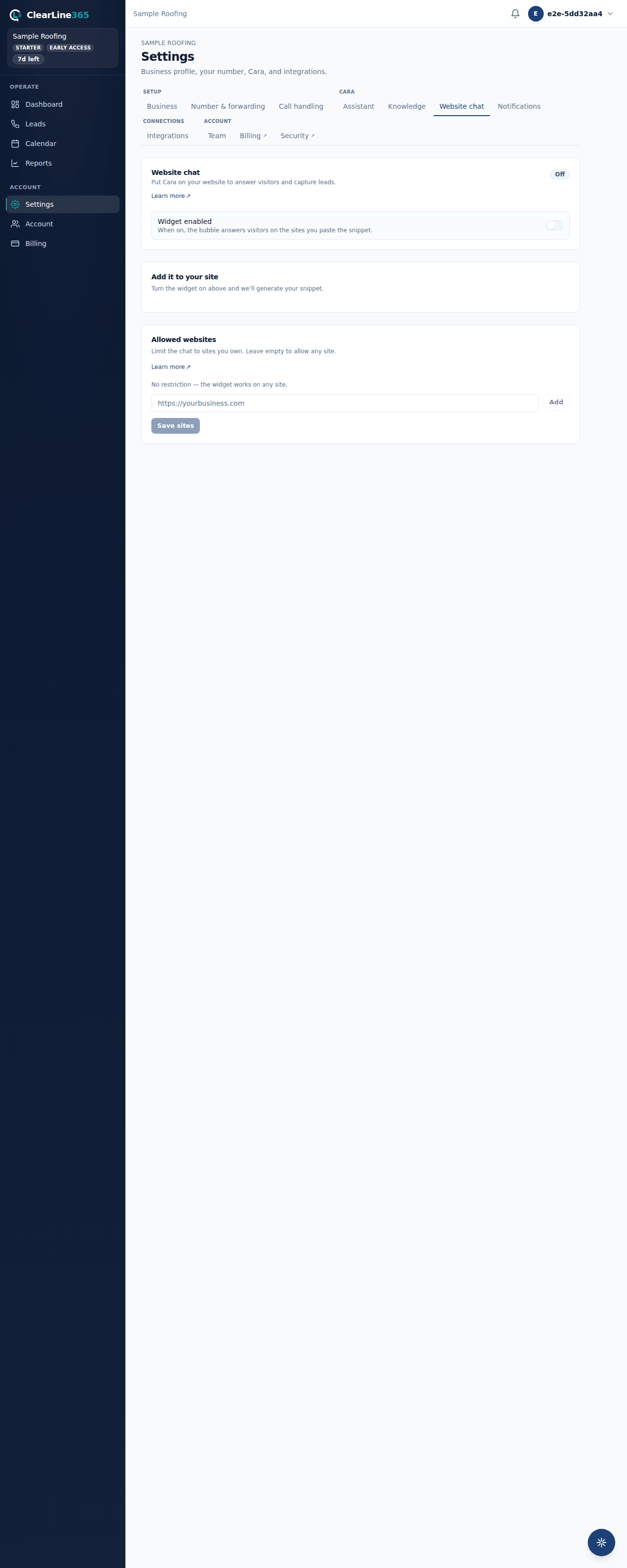
By default, the chat panel works on any site that carries the snippet — an empty list means no restriction. Add the exact addresses you want to allow, like https://yourbusiness.com, under Settings → Website chat → Allowed websites (up to 20 sites). This narrows which sites can open the chat panel — it's an extra guardrail, not the widget's main security control. The real isolation between businesses is enforced on our servers regardless of this list.
Rotate your key
- Go to Settings → Website chat → Widget key.
- Click Rotate key. The current snippet stops working the moment you do this.
- Update the
data-clearline-keyvalue in your site's script tag to the new key.
Revoke the widget entirely
Click Revoke widget to turn it off everywhere at once, without deleting your other settings. Turning it back on mints a brand-new key — your old snippet doesn't come back to life.
What to expect
Rotating or revoking takes effect immediately; there's no delay to wait out. If you forget to update your site after rotating, the bubble stops answering until you paste the new snippet.
Limits
- Rotating and revoking are owner-only actions.
- There's no history of past keys or a way to check from ClearLine365 which one is live on your site — the truth is whatever you last pasted there.
- Removing every allowed website doesn't turn the widget off; it only removes the site restriction.
Common questions
Why rotate a key that's "public by design"?
Because public doesn't mean harmless to overuse. If you tear down a site or a key ends up somewhere you didn't intend, rotating cuts it off immediately rather than leaving it live indefinitely.
If I add an allowed website, does the old snippet still work everywhere else?
No — once you save a non-empty allowed-websites list, the chat panel refuses to open on any site outside it. The bubble may still appear, but clicking it won't load a working conversation.