Blocking spam and robocalls
Two switches and a block list decide which calls never reach your alerts, and both switches start off.
Last checked against the product on
Wrong numbers, warranty robocalls, and the occasional toll-free spoof all ring your ClearLine365 number the same as a real customer. Nothing turns a caller away until you say so — both switches below start off, and it stays your call.
How it works
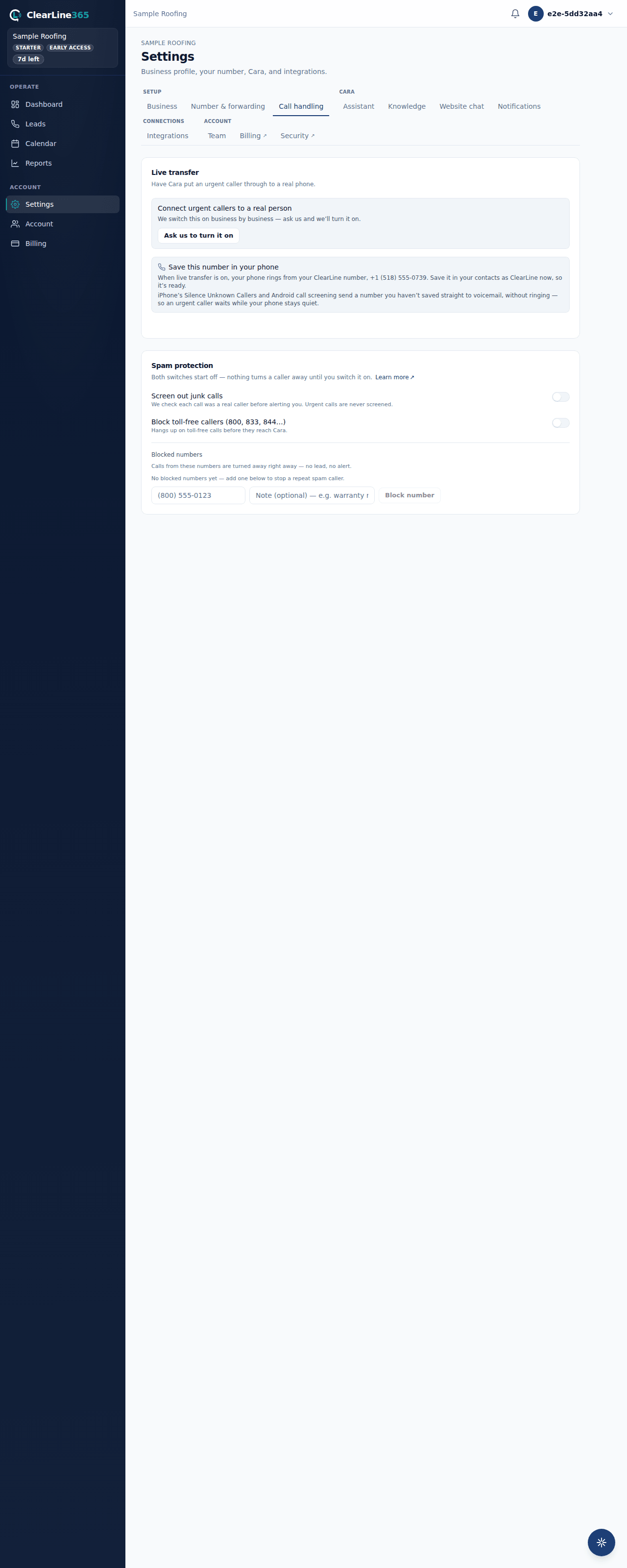
- Settings → Call handling → Spam protection has two switches and a manual block list.
- Both switches start off. Nothing turns a caller away until you turn one on.
- A turned-away or screened call still shows up in your call history — it just never rings your phone with an alert.
- Changes on this card save immediately; there's no separate save step.
Turn on spam protection
- Go to Settings → Call handling.
- Under Spam protection, turn on Screen out junk calls to have Cara check, after each call, whether it was a real caller before alerting you. Wrong numbers, test calls, and robocalls stay out of your alerts this way. Urgent calls are never screened out. Leave it off and every call alerts you.
- Turn on Block toll-free callers (800, 833, 844…) to hang up on toll-free calls before they reach Cara at all. This one starts off on purpose — plenty of toll-free calls are robocalls, but insurance adjusters, warranty companies, and property managers call from toll-free numbers too.
- To block one specific number, scroll to Blocked numbers, enter the number and an optional note (for example, "warranty robocall"), and select Block number. Calls from that number are turned away right away — no lead, no alert.
What to expect
- A blocked or screened-out call still appears in your call history; it simply doesn't trigger a phone alert.
- Blocked numbers show in the list with the note you gave them, and you can remove one at any time to unblock it.
- A failed save reverts the switch and shows a plain error message — nothing is left in an unclear state.
Limits
Screening out junk calls happens after the call, based on what Cara heard — it can't stop a call from ringing in the first place. Blocking toll-free callers is all-or-nothing: you can't allow one toll-free number while blocking the rest through that switch alone, though you can still hand-block or hand-allow specific numbers on the block list.
Common questions
Will a screened-out call still reach Cara?
Yes. Screening decides whether you get an alert, not whether Cara answers. Every caller still reaches Cara and can still leave a message or book.
What happens to a number I unblock?
It goes back to ringing normally the next time it calls — nothing about its call history changes.