The notify list, and how many people your plan allows
Add an office manager or on-call tech to get texted on every new lead, at no extra cost on any plan.
Last checked against the product on
You are always notified about a new lead — but you are not always the one who should call it back. The notify list is where you add the people who should hear about a lead the moment Cara captures one.
How it works
- You, the owner, are the built-in default recipient. You never need to add your own number.
- The notify list is additional people — an office manager, a dispatcher, an on-call tech.
- During your free trial you get Pro's 5 people whichever plan you chose; the number changes to your plan's when the trial converts.
- Every plan includes a notify list at no extra cost: Basic 1, Starter 3, and Pro 5 additional people. There is no per-recipient fee.
- Each recipient can be set to All leads or Urgent only, so someone can be texted just for the calls that matter most to them.
- Delivery to the list activates once text messaging is turned on for your account. Until then, your list still saves — the texts simply start automatically once it is.
Add someone to the notify list
- On the website, go to Settings → Notifications and find the Lead alert notify list card. In the app, go to Settings → Alerts → Lead-alert notify list.
- Enter their name and mobile number.
- Choose Notify on: All leads or Urgent only.
- Save. They start receiving texts as soon as text messaging is active for your account.
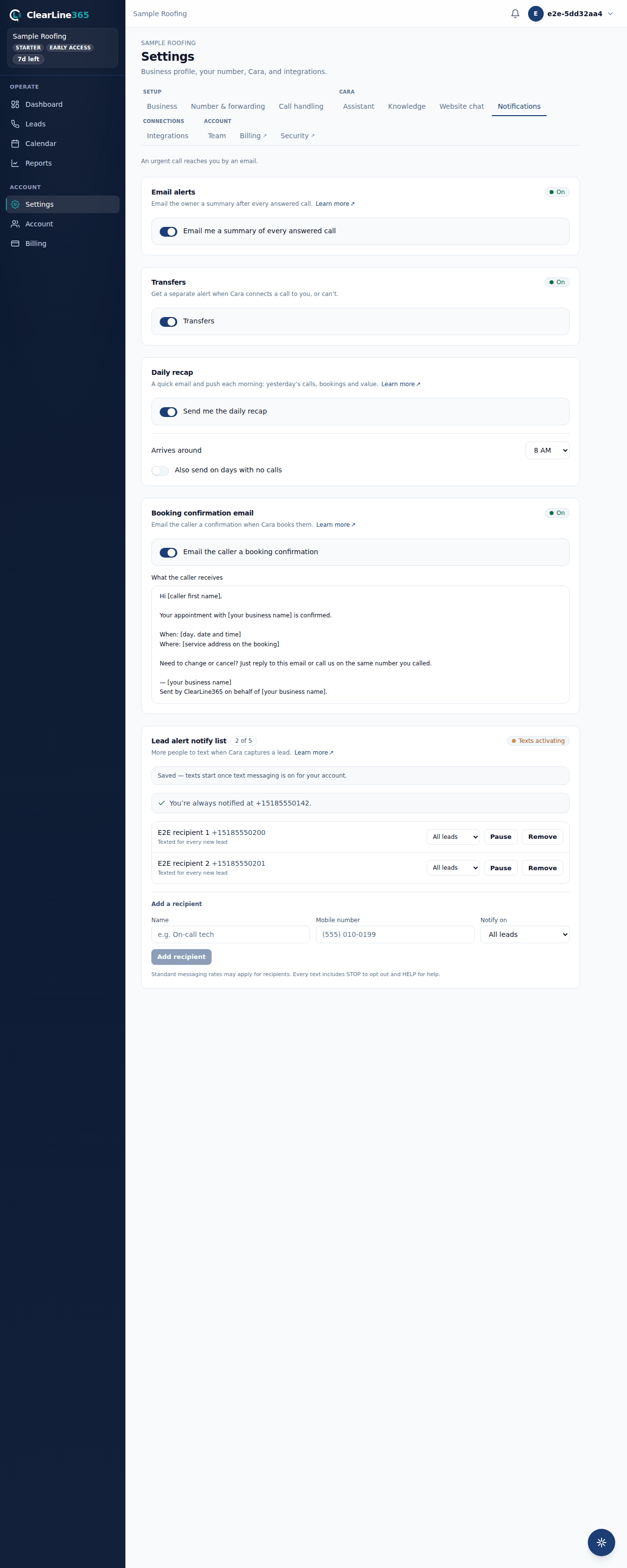
Only an owner can add, pause, or remove people on this list.
What to expect
Each person on the list gets the lead's name, callback number, address, and a short summary by text — the same information you get, addressed to them. You can pause a recipient without removing them, and remove anyone at any time.
Limits
Your plan sets how many additional people the list holds: 1 on Basic, 3 on Starter, 5 on Pro. Once you have added everyone your plan includes, the card tells you so and, if you are not already on Pro, what Pro's allowance is. There is no way to buy more slots on your current plan — moving to a higher plan is the only way to add more people.
Common questions
Do I count as one of the recipients?
No. You are the built-in default recipient and are never counted against the list's allowance, even if you try to add your own number — the notify list only tracks additional people.
What happens if I go over my plan's allowance after a downgrade?
Your saved list is not deleted. If a downgrade puts you over your new plan's allowance, the people you added first keep getting texted and the rest go quiet until you either remove someone or move back up.