Connect Cara to Zapier
Accept one Zapier invite, generate an API key, and get native triggers for new leads, won leads, and bookings in your Zaps.
Last checked against the product on
Every new lead, correction, won lead, and booking Cara handles can kick off a Zap the moment it happens — no export, no manual copy-paste into a spreadsheet or CRM. The ClearLine365 app on Zapier connects to over 6,000 apps that way. Connecting takes two steps, both from the Zapier card in your settings.
How it works
- Six triggers are available: New Lead, Lead Updated, Lead Won, New Booking, Booking Updated, and Booking Cancelled.
- Each one fires the moment the event happens — deliveries are pushed to Zapier, not polled on a schedule.
- The app offers triggers only today. There are no actions or searches yet, so a Zap can start from ClearLine365, but it can't write back into it.
Connect Zapier to Cara
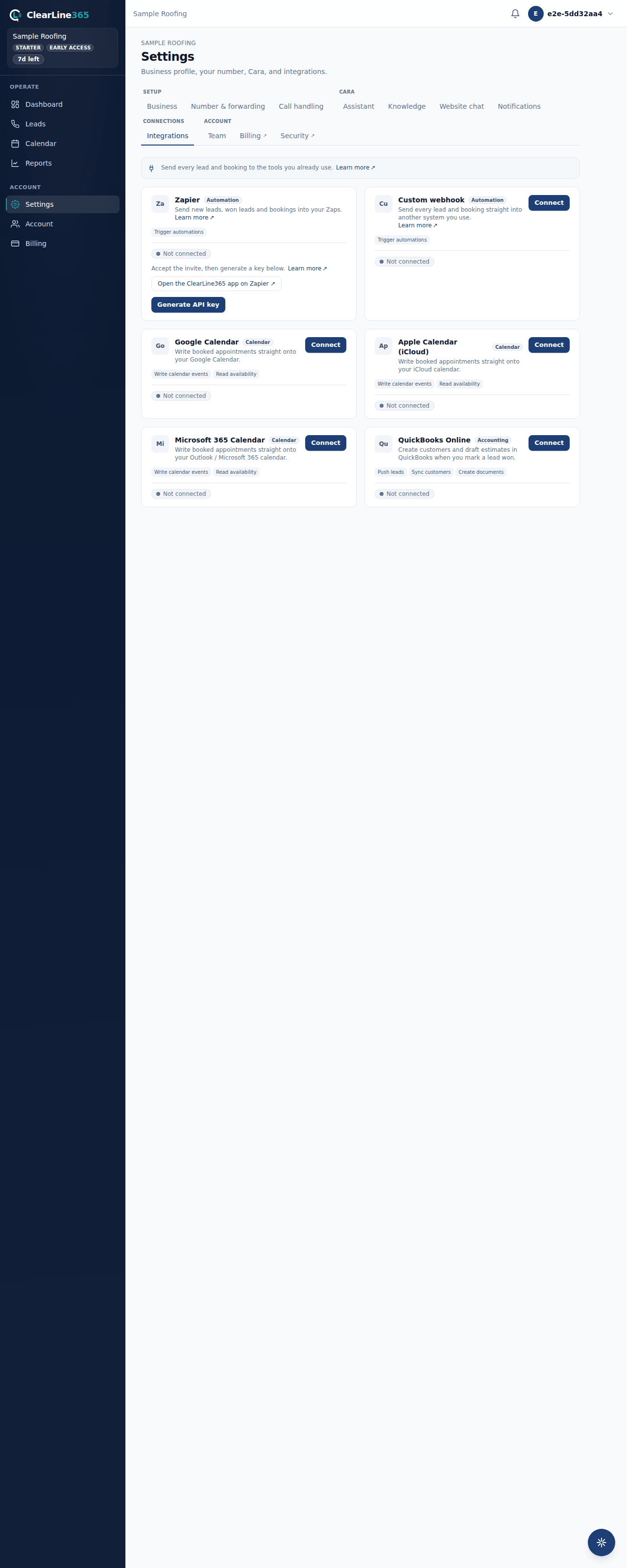
- In ClearLine365, go to Settings → Integrations and find the Zapier card.
- Click Open the ClearLine365 app on Zapier ↗ and accept the invite. The app is Invite Only, so this step is what makes ClearLine365 show up in the Zap editor at all — it's a one-time step per Zapier account.
- Back in ClearLine365, click Generate API key. Copy the key immediately; it's shown once and never displayed again.
- In Zapier, start a new Zap, choose ClearLine365 as the trigger app, pick a trigger, and paste your key in when Zapier asks you to sign in.
What to expect
Once connected, the Zapier card shows Connected, and once Zapier has called in at least once, how many Zap triggers are subscribed and when the key was last used. The first real event — a call comes in, a lead gets marked Won, or an appointment books — fires the Zap right away; there's nothing to test manually beyond letting Cara handle a real call.
Limits
- Zapier is available on Starter and up; Basic doesn't have it.
- One API key per business. Regenerating it rotates the key — every Zap using the old one stops working and has to reconnect with the new one.
- Turning the switch off on the Zapier card pauses every Zap without deleting your key; switch it back on to resume.
- Only the six triggers above exist today. There's no action to push data into ClearLine365.
Common questions
Do I have to accept the Zapier invite every time?
No — once per Zapier account. After that, ClearLine365 stays visible in the Zap editor.
What happens to my Zaps if I regenerate my key?
They stop working until you paste the new key into each one. Regenerating is a real rotation, not just a display refresh.
Can I use the Custom webhook and Zapier at the same time?
Yes. They're two separate ways to reach other systems — see Custom webhooks: the signed payload.