Change your plan mid-cycle
Switch plans any time from Billing — the change applies the same day, and you're never charged the full new price out of nowhere.
Last checked against the product on
Outgrowing your included minutes, or paying for more than you're using — either way, changing plans doesn't wait for your renewal date.
How it works
- Upgrading takes effect immediately. The prorated difference for the rest of this period is added to your next invoice — you're not charged that amount today.
- Downgrading also takes effect immediately. The unused difference from your old plan is credited toward future invoices. Minutes you had already used past your old plan's allowance are billed at that plan's rate before the change, so moving down neither wipes them out nor re-prices them.
- During a free trial, picking a plan just locks in what you'll be billed for when the trial ends — you pay nothing today, and nothing about the trial itself changes.
Change your plan
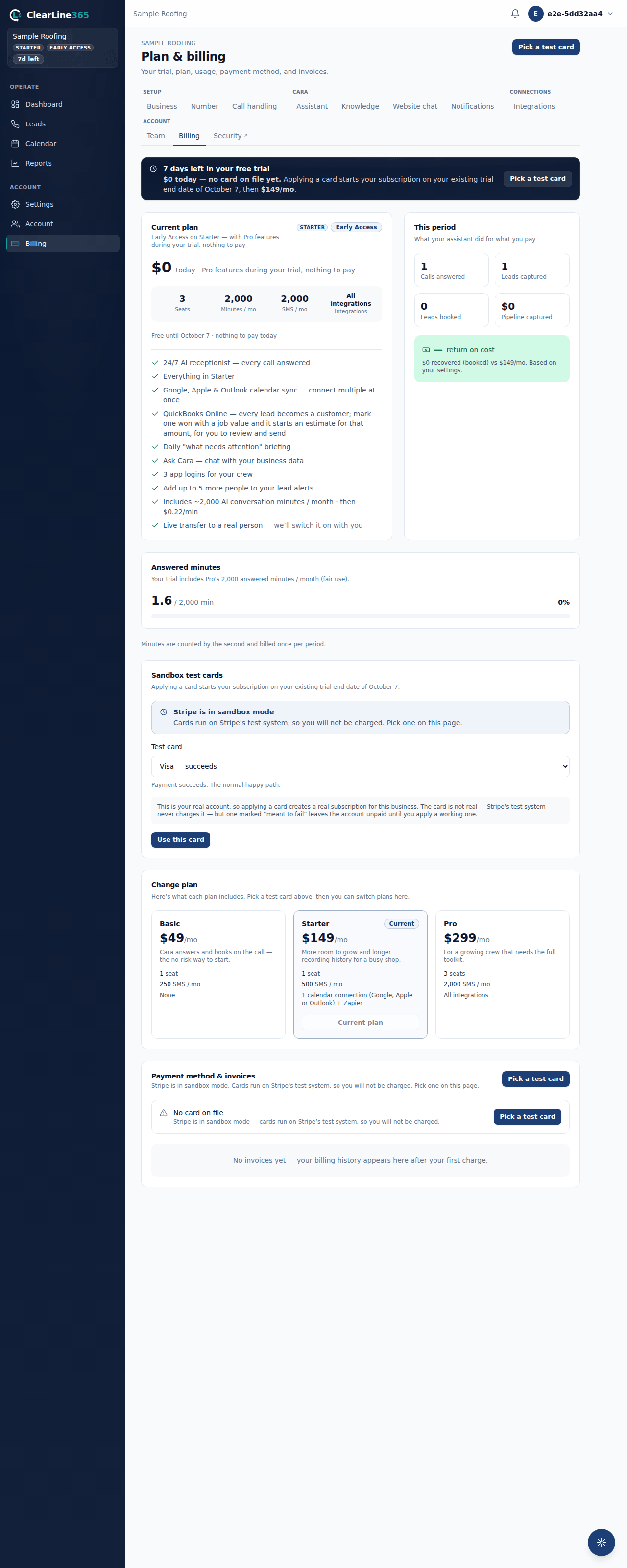
Stripe is in sandbox mode. Cards run on Stripe's test system, so nothing is charged. Add a card from the Sandbox test cards panel on the Billing page first — the switch buttons below appear once a card is on file. If your subscription has lapsed, applying a test card brings the account back; ask us if you'd rather we moved you.
- Go to Billing in the left nav. Plan changes are a web-only action — the mobile app hands off to the same page rather than duplicating it.
- Under Change plan, choose Upgrade to \<plan\> or Switch to \<plan\> on the plan you want.
- Read the line that appears under it: an upgrade shows the exact prorated amount headed to your next invoice once it's calculated; a downgrade tells you the difference will be credited.
- Choose Confirm.
What to expect
- Your new plan's minute allowance, overage rate, and features apply right away — there's no waiting for the billing period to turn over.
- An upgrade's prorated charge lands on your next invoice, not as a separate charge today.
- A downgrade's credit shows up on a future invoice rather than as an immediate refund.
Limits
- Only an owner can change the plan.
- You can move between Basic, Starter and Pro. If none of those fit, contact support.
Common questions
Am I charged twice if I upgrade partway through the month?
No — you pay the prorated difference on your next regular invoice, not a second charge right away.
Can I switch plans more than once in a billing period?
Yes. Each change is calculated against your plan at that moment, so switching again simply reprices from where you are now.