Connect Microsoft 365 or Outlook Calendar
Link your Microsoft 365 or Outlook calendar so Cara books straight onto it and treats anything already there as unavailable.
Last checked against the product on
Your schedule already lives in Outlook or Microsoft 365, and you'd rather Cara write appointments there than manage a second calendar. Connect it once, and every appointment Cara books lands on your Outlook calendar directly — and anything already on it keeps that time off the table.
How it works
- ClearLine365 asks Microsoft for permission to read and write events on your calendar, plus a basic profile read so the Integrations tab can show which account is connected. It does not request access beyond your calendar.
- Once connected, that calendar's free/busy time becomes authoritative: Cara won't offer or book a time it shows as busy.
- Every appointment Cara books gets exactly one matching Outlook event.
- Both personal Microsoft accounts and Microsoft 365 work or school accounts can connect.
Connect it
- Go to Settings → Integrations.
- Find the Microsoft 365 Calendar card and select Connect.
- Sign in with the Microsoft account that holds your work calendar and approve the calendar access it asks for.
- You'll land back on Settings with the card showing Connected and the account it's connected to.
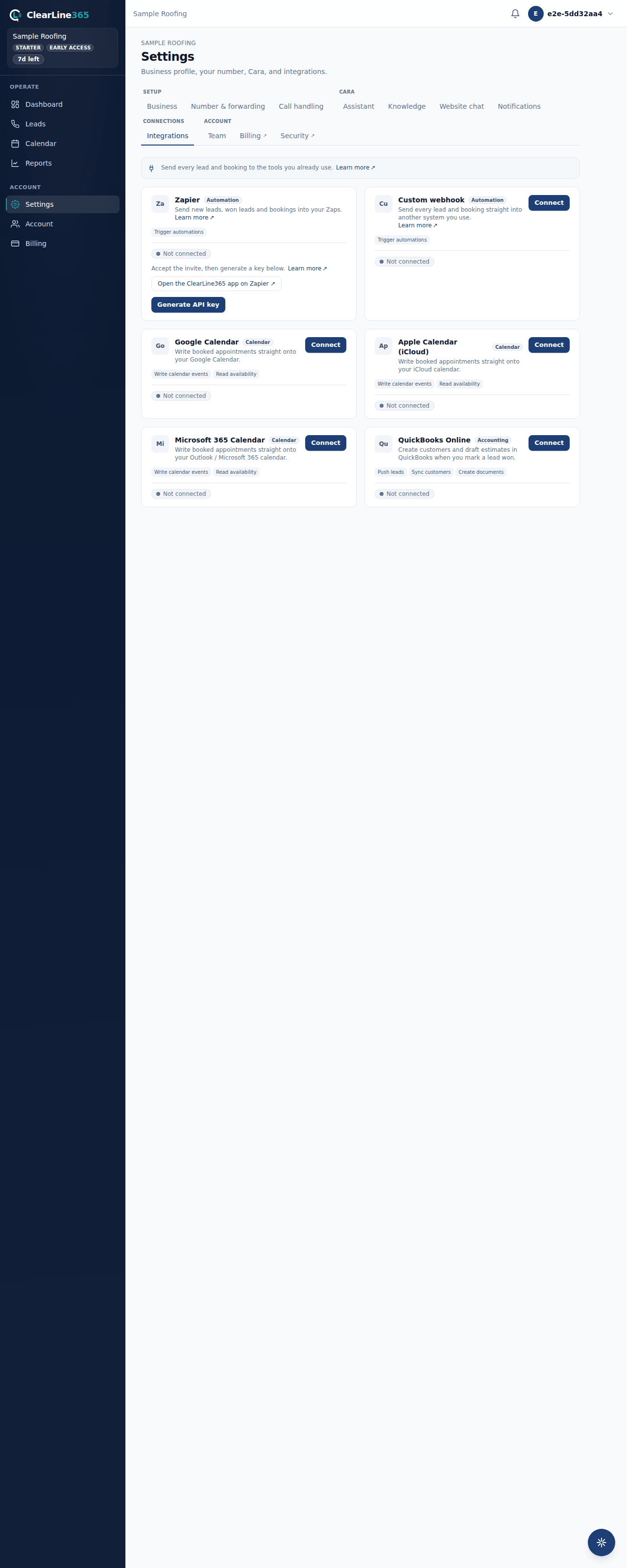
What to expect
Any appointment Cara books during a call appears on that Outlook calendar within moments, and any event already there keeps that time unavailable to Cara.
If you're connecting a Microsoft 365 work or school account, some organizations require an administrator to approve new apps the first time someone in that organization connects one. If you see a message asking for admin approval, that's your organization's own consent policy — it isn't specific to your account, and a personal Microsoft account never hits it.
Limits
- Basic has no calendar integrations. Basic uses the built-in ClearLine365 calendar only — Microsoft 365 Calendar sync starts at Starter.
- Starter holds one calendar connection at a time — Google, Apple, or Microsoft 365, your choice. Disconnect the first to switch, or upgrade to Pro to run more than one calendar at once.
- Pro and above may connect multiple calendars simultaneously.
- If ClearLine365 can't reach Outlook for a moment during a live call, Cara still books the appointment rather than making the caller wait — see Who decides availability for what happens then.
Common questions
Do I need a work Microsoft 365 account, or does personal work too?
Either works. Connect whichever account holds the calendar you actually work off of.
Will this touch anything besides my calendar?
No. The connection is scoped to reading and writing your calendar and reading your basic profile so the Integrations tab can label which account is connected — nothing else.