Business hours, closed days, and what Cara says after hours
Set your weekly hours and mark the days you're closed, so Cara books inside them and tells callers the truth after hours.
Last checked against the product on
Cara answers every call, day or night — but what she says and what she offers to book both depend on whether you're actually open. Set your hours once and mark your holidays and days off, and she stays honest about both without you telling her live.
How it works
- Cara books appointments only inside the hours you set, and speaks the same hours out loud — the two can never drift, because both read the same weekly grid.
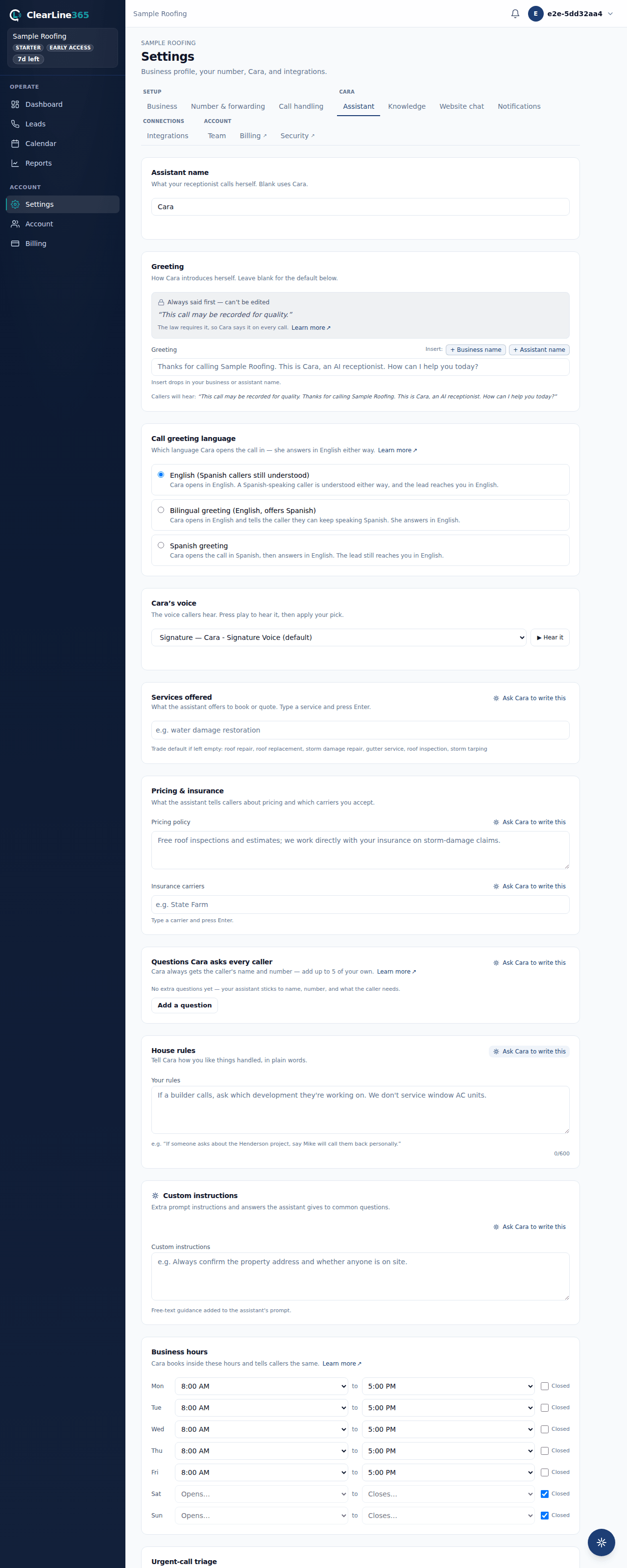
- Every new business starts on Monday to Friday, 8:00 AM to 5:00 PM, closed Saturday and Sunday. Change anything that's different.
- On a day you're closed — a holiday, a listed closed day, or simply after hours — Cara still answers, still captures the full lead, but acknowledges the closure and offers the next day you're open.
- Urgent calls always reach you a minute or two after the call, closed or not. Cara never puts an urgent caller into a callback promise.
Set your hours and your closed days
- On the app, go to Settings → What Cara says and find Business hours. Tap the days you're open and pick your hours. Different hours on some days? Tap Add different hours for some days, tap those days, and pick their hours. The line under the hours shows exactly what Cara will tell callers.
- On the website, go to Settings → Assistant and find the Business hours card. For each day, pick an opening and closing time, or check Closed.
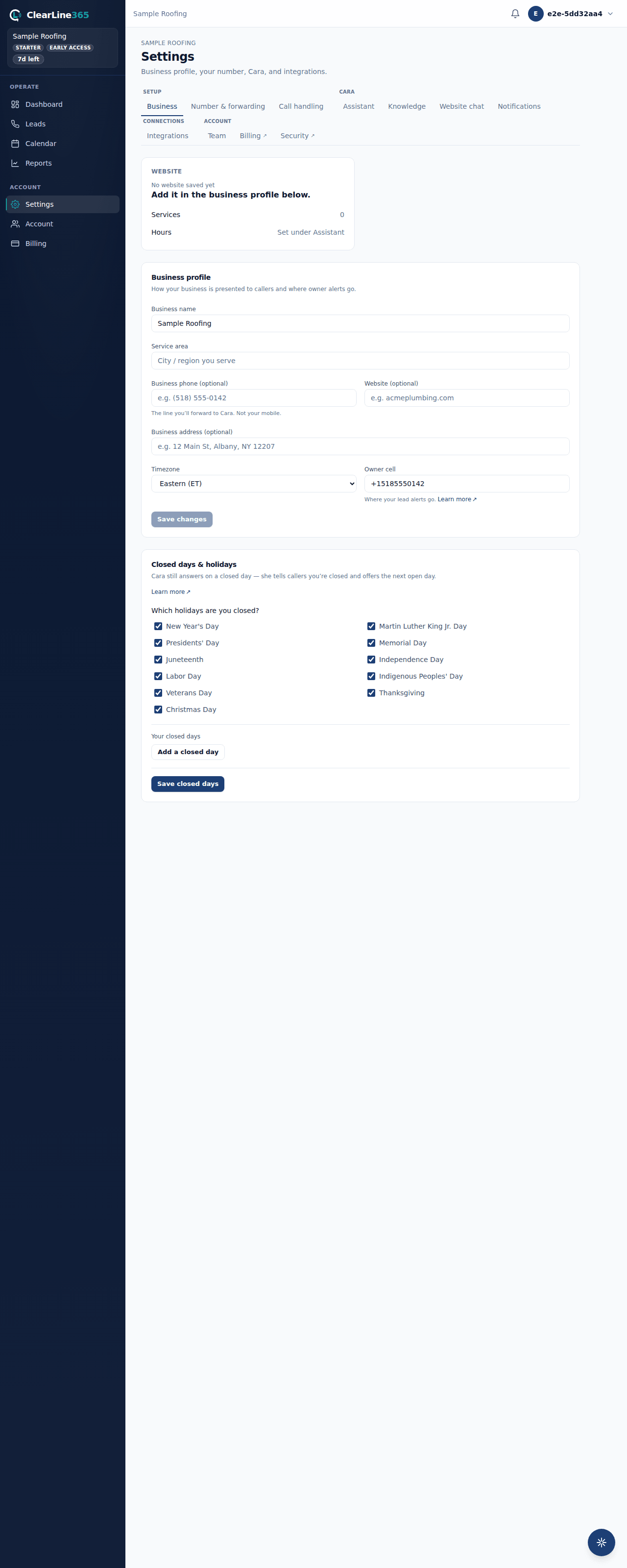
- Go to Settings → Business and find the Closed days & holidays card (on the app, both hours and closed days live together under Business hours & closed days, reached from Settings → Business details).
- Under Which holidays are you closed?, every US federal holiday starts checked. Uncheck any holiday you work — the actual date is worked out automatically every year, so there's nothing to update annually.
- Under Your closed days, select Add a closed day for anything else — a vacation, a job fair, an off day — pick the date and an optional label like "Vacation."
- Save. Changes apply to the next call.
What to expect
When a call lands on a day you're closed, Cara tells the caller why in the same breath she takes their information — a holiday by name, a closed day by its label, or simply that you're closed for the day — and offers the next day you're open. She still gets their name, number, and what they need, and you still get the alert. An urgent call is never delayed by any of this: it alerts you a minute or two after the call ends, exactly as it would during business hours.
Limits
- Each day supports one open-to-close window — there's no way in the editor to enter a second shift for the same day (e.g. open in the morning, closed for lunch, open again in the afternoon).
- Cara's "next open day" is calculated up to 14 days out. If you're closed longer than that, she'll still take the message and acknowledge the closure, just without naming a specific reopening day.
- If your hours are ever stored in a form Cara can't parse, she never wrongly claims you're closed — she fails open and simply doesn't mention hours rather than guessing wrong.
Common questions
Do I need to update the holiday dates every year?
No. Checking a holiday marks it closed permanently — the actual calendar date for each year is computed automatically, so Thanksgiving is always the right Thursday without you touching the setting again.
What if I'm open on a holiday most businesses take off?
Uncheck it. An unchecked holiday is treated as an ordinary working day, using whatever hours you've set for that day of the week.