Choosing a voice and naming your assistant
Preview and pick the voice Cara answers with, and give her whatever name fits your business.
Last checked against the product on
The voice a caller hears is part of how they judge whether they've reached a real business. You can preview a curated set of voices and pick the one that fits, and you can call your assistant something other than Cara if you'd rather she introduce herself differently.
How it works
- Every account starts on the default voice, "Cara - Signature Voice." You can preview any voice in the catalog and switch at any time.
- The voice you pick applies the moment you save it — no confirmation step, no wait for the next billing cycle.
- Cara is the assistant's own name for the product; the name your callers hear her use is a separate, optional setting.
Pick a voice and name your assistant
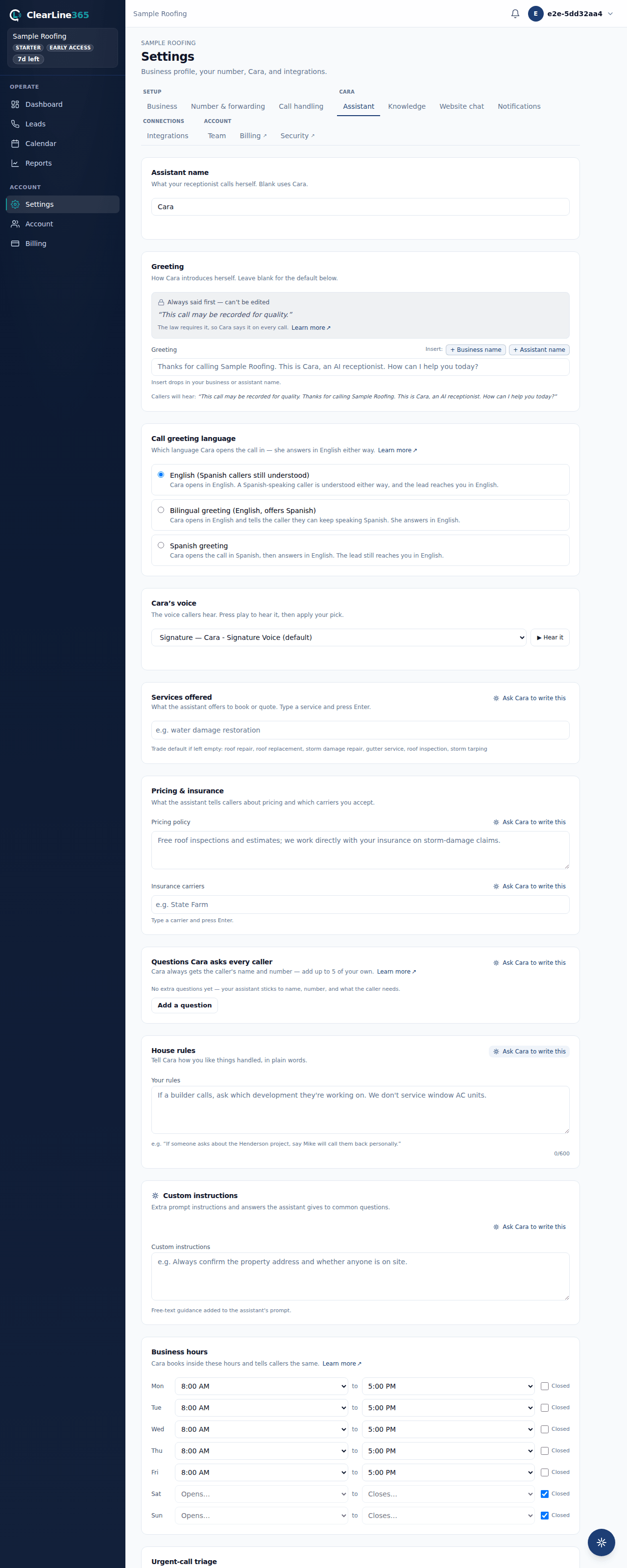
- Go to Settings → Assistant and find the Cara's voice card.
- Use the dropdown to browse the voice catalog.
- Select the play button to hear a preview of the highlighted voice. If a voice has no preview clip yet, the play button is disabled and says "Preview coming soon" rather than failing silently.
- Pick the voice you want — it saves immediately, no separate confirm step.
- To rename your assistant, find the Assistant name card above it and type the name you want (up to 40 characters). Leave it blank to keep the default, "Cara."
What to expect
Your chosen voice and name both apply on your very next call — nothing waits for a redeploy or a scheduled change. The name you set is spoken by the assistant on every call and appears anywhere your greeting or prompt references it.
Limits
- The voice catalog is curated by ClearLine365 — you choose from the list rather than uploading or cloning a voice.
- If the catalog fails to load, the voice card shows an honest "voices couldn't load right now" message and keeps your current voice rather than falling back to a broken picker.
- Renaming your assistant changes only what she calls herself — it does not change her voice, and it does not change what she says.
Common questions
Does changing the voice affect anything else, like the language she answers in?
No. Voice and language are separate settings. Every voice answers in English regardless of which one you pick — see Spanish-speaking callers: what works today for what's tenant-controlled there.
Can I preview a voice before switching?
Yes — the play button on the voice card previews whichever voice is highlighted in the dropdown, before you commit to it.