Business information: every field and why it matters
Fill in your business name, services, pricing, and house rules so Cara answers callers the way you actually run your business.
Last checked against the product on
Cara starts answering calls the moment your number forwards to her, using sensible defaults for your trade. But she doesn't know your service area, your pricing, or that you never work on window AC units until you tell her. Every field below feeds directly into what she says on the next call — nothing here is cosmetic.
How it works
- Fields you fill in override the trade defaults shown as placeholders. Leave a field blank and Cara falls back to that default, then a global default if the trade has none.
- Everything saves automatically as you type or make a selection — there's no Save button to forget. A failed save reverts the field to its last stored value and tells you so.
- Changes apply on the next call. Nothing here requires a callback or a wait.
Fill in your business information
- Open Settings → Business (mobile: Settings → Business details) for your identity and contact fields, and Settings → Assistant for what Cara knows and says.
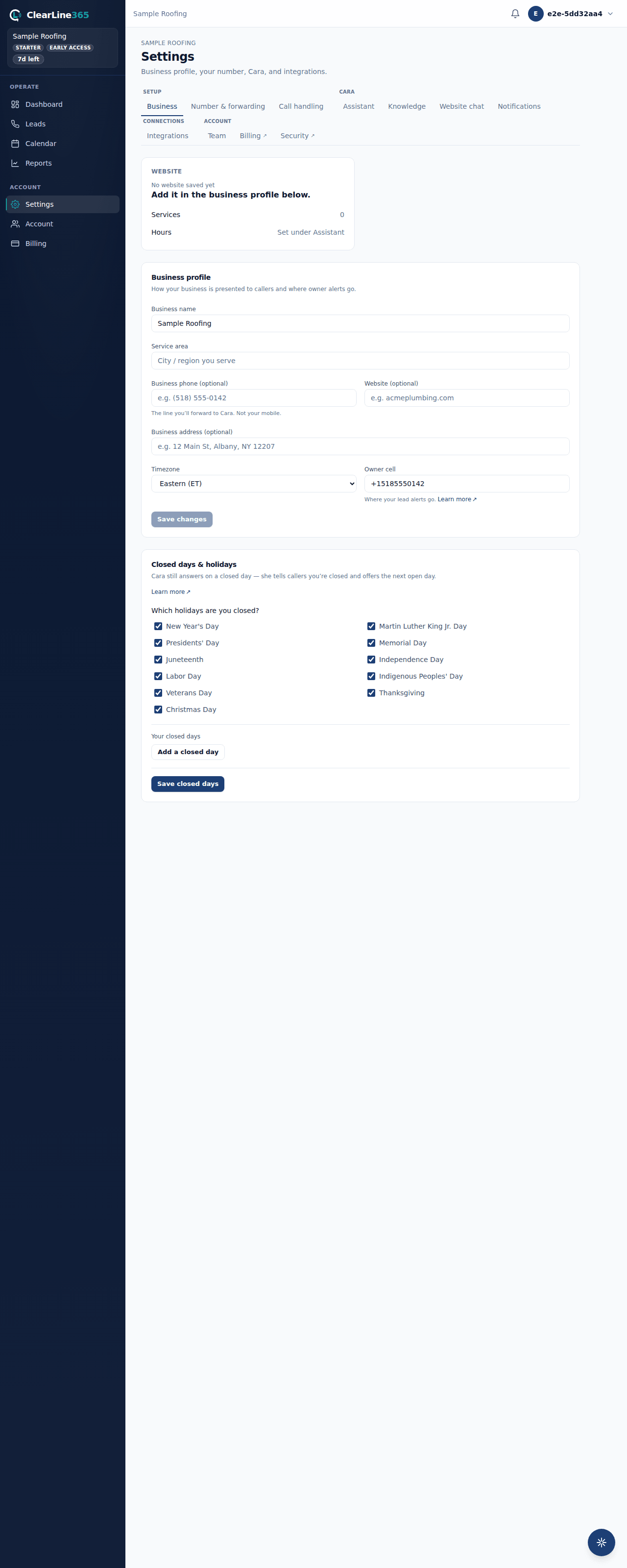
- Under Business profile, set your business name (what Cara calls your company) and your service area (up to 120 characters — shown to Cara for routing context, not read verbatim to every caller).
- Under Contact & timezone, set your timezone and your owner cell — the number your lead alerts go to on the website and in the app. On the web Business tab, these fields wait behind a Save changes button; on mobile they save the moment you leave the field.
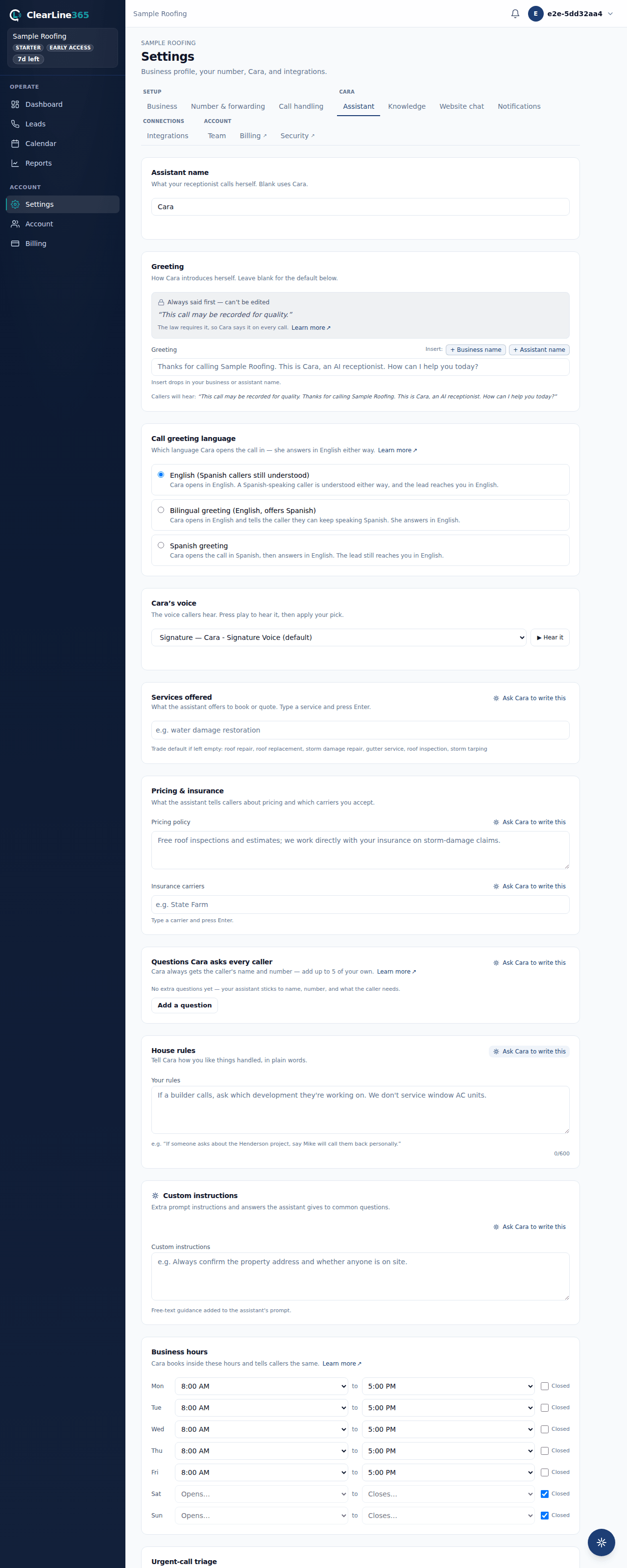
- On the Assistant tab, give your assistant a name if you don't want to keep "Cara" — up to 40 characters, spoken on every call and injected wherever your greeting or prompt mentions it.
- Write or leave blank your greeting — the line Cara speaks right after the locked disclosure that the call may be recorded and that she's an AI. That disclosure can't be edited or removed; your greeting is what comes after it.
- Add your services offered as chips (type one, press Enter) — what Cara offers to book or quote.
- Write your pricing policy (up to 600 characters, e.g. "Free estimates; service-call fee applies") and add the insurance carriers you accept as chips.
- Add up to 5 questions Cara asks every caller while taking a message (up to 120 characters each) — she asks them word for word and puts the answers in your lead alert. She always gets the caller's name and number regardless of what you add here.
- Write your house rules in plain language (up to 600 characters) — instructions for Cara the way you'd brief a new receptionist, e.g. "If someone asks about the Henderson project, say Mike will call them back personally."
- Add urgent-call keywords as chips — the words that flag a call as urgent (e.g. "flood," "no heat"). What Cara does with an urgent call is the same for every business and isn't a setting: she captures the caller's name, number, address, and what's happening, then alerts you a minute or two after the call ends, around the clock, with no voicemail.
- Set booking rules — appointment length, buffer between jobs, and minimum lead time, all in minutes — the defaults Cara uses when she books directly on your calendar.
What to expect
Every field autosaves — you'll see a quiet "Saving…" then "Saved" indicator (web Assistant tab), a save-on-blur commit (mobile), or an explicit "Saved." message after pressing Save changes (web Business tab). The Assistant tab also shows you exactly what Cara will say: a live preview line under the greeting box reads "Callers will hear: …" with the locked disclosure plus your greeting substituted in.
Limits
- Custom instructions — free-text guidance appended to Cara's prompt, up to 2,000 characters — is a Pro ($299/month) feature. Basic and Starter accounts don't see this box.
- Service area and pricing policy are shown to Cara as context, not necessarily spoken to callers word for word.
- Only an owner can edit business information. Anyone else sees the same screen read-only.
- Business hours, closed days, Cara's voice, and the greeting language (English, bilingual, or Spanish) live on their own settings and have their own articles — see Business hours, closed days, and what Cara says after hours, Choosing a voice and naming your assistant, and Spanish-speaking callers: what works today.
Common questions
What happens if I leave a field blank?
Cara uses your trade's default for that field (shown as the placeholder text), and falls back further to a general default if your trade has none. An unconfigured business still answers correctly — filling in these fields just makes her sound like you specifically.
Can Cara invent a price if I haven't given her one?
No. She answers from what you've written in your pricing policy and insurance carriers. Anything you haven't covered becomes a message for you, not a guess.