Turn forwarding off, or pause Cara
Stop calls reaching Cara whenever you want, one line at a time, by turning off the same forwarding you turned on.
Last checked against the product on
Closing up for the day, heading out for a week, or just want your phone to be your phone again? There is no separate switch for that inside ClearLine365. The lever is the forwarding you set up in the first place: turn it off and calls ring your phone the normal way again, and Cara stops seeing them until you turn it back on.
Each line stops on its own, so you can leave the shop phone with Cara and take your own back, or the other way round.
Turn off the phone in your hand
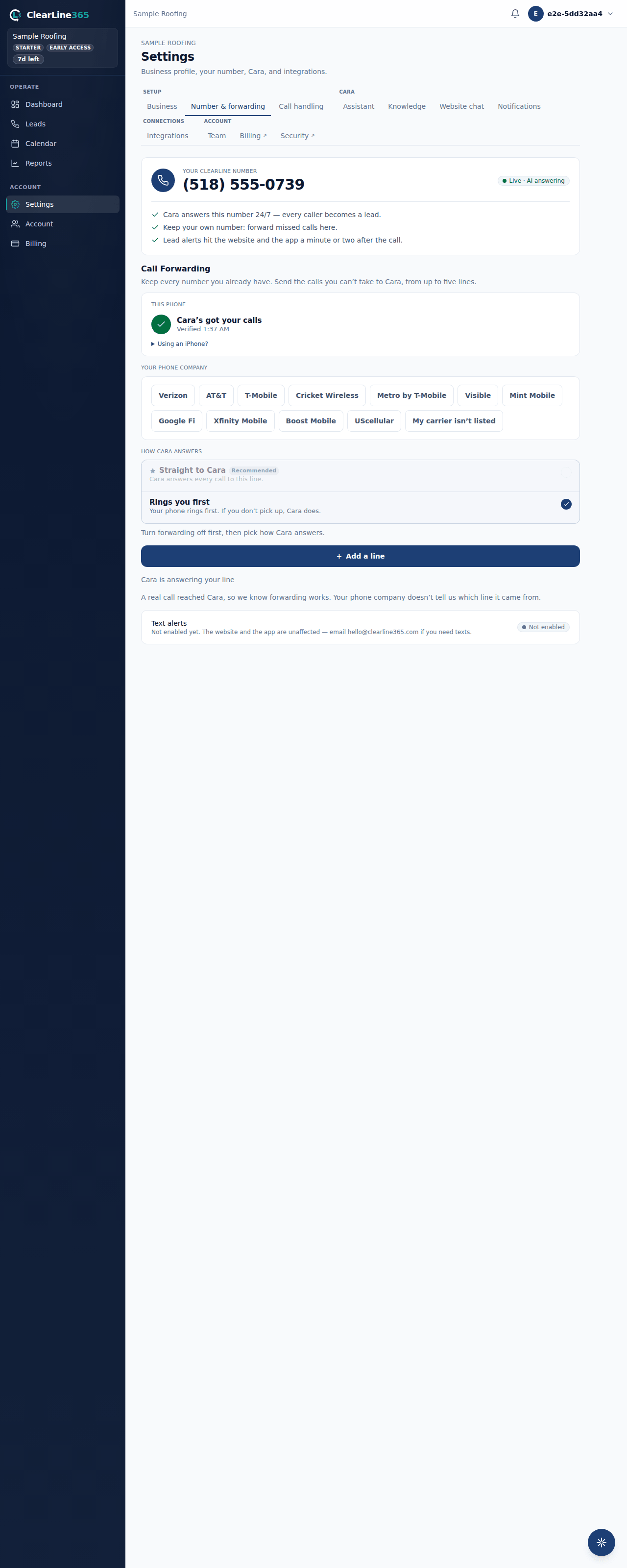
- Open Settings → Number & forwarding → Call Forwarding on the web, or tap the forwarding card at the top of your Leads screen in the app. Both open the same screen.
- This phone is at the top. Turn its switch off.
- Your dialer opens with the off code already in it. Press call and wait for the tone.
That is the whole thing. The app knows your carrier, so it knows which code turns yours off.
How Cara answers, and why it locks
Call Forwarding has one setting above your lines: How Cara answers. Rings you first means your phone rings and Cara picks up the calls you don't. Straight to Cara means she answers every call to that line and your phone stays quiet. The two use different forwarding codes, so the setting is fixed while anything is forwarding — turn your lines off first, pick the one you want, then turn them back on. Whichever you pick is used the next time you turn a line on.
Turn off any other line
The app can only dial for the phone it is running on, so every other line is a code somebody dials where that line lives, or a setting on a website. Open the line in Call Forwarding and tap Turn it off, and ClearLine365 shows you what to do.
- Landline. Dial
*73on a phone plugged into that line. - Another mobile. Dial that phone's off code on that phone. Verizon uses
*73either way. AT&T and T-Mobile use a different code for each of the two ways Cara can answer: on Rings you first it is#61#on AT&T and##61#on T-Mobile, and on Straight to Cara it is#21#on AT&T and##21#on T-Mobile. The wrong one of the pair reports success and leaves the line forwarding, so ClearLine365 prints the one that matches how the line was turned on — not how How Cara answers is set today. - VoIP line. Sign in to your provider's website and switch call forwarding off, or take the forwarding number back out.
Then come back and confirm it — Done, I dialed the off code on a second cell, Done, I turned it off on a landline or a VoIP line — so the list matches what you actually did.
If you turned on more than one kind of forwarding on a phone — one rule for busy, another for no answer — each one has its own off code and needs its own turn.
What to expect
Dial codes answer with a short tone right away. A provider's website confirms by saving. Either way, calls start ringing that phone the normal way again immediately, and Cara stops receiving them until you forward it to her again.
Calls that already reached Cara stay where they are. Your recordings, transcripts and leads are untouched.
Limits
- Turning forwarding off changes nothing about your account. Your plan and the rest of ClearLine365 keep working exactly as before.
- The switch on a line you dialed yourself is your answer, not a reading from the network. ClearLine365 can't watch your phone company, so if you change forwarding directly with them it won't know until you say so.
- Cara can only answer a line that is forwarded to her. There's no way to pause her for a few hours and have calls come back on their own; you turn it off, then turn it on again.
Common questions
Do I need to cancel anything to stop Cara answering?
No. Forwarding is a setting on your phone line, not in ClearLine365. Turn it off with your phone company and Cara stops getting those calls; turn it back on and she starts again. Nothing about your plan changes either way.
I dialed the off code but the line still says it's on. What now?
Open it, tap Turn it off, and confirm. The line records what you tell it, so if you dialed straight from your dialer rather than through ClearLine365, it has no way of knowing. The next call is the tiebreaker: if one still reaches Cara, the code did not take.
Can I turn off one line and leave the others?
Yes, and plenty of owners do. Take your own cell back on a Saturday and let the shop line keep going to Cara — each line is turned off on its own and nothing links them.